DMA on Dell XPS (PCILeech)
Trying to get DMA working on a Dell XPS 13 booting ubuntu from a usb. using PCILeech
- tags
- #DMA #Hacking #Valdtaniem
- categories
- CBC26
- published
- reading time
- 4 minutes
Getting started
DMA stands for Direct Memory Access.
I am using pcileech with a captain DMA M.2 . This is an fpga device so most of the features should work.
Installing DMA device
The xps i’m using only has one m.2 slot, so I can’t boot into an os as you would normaly. I have to boot into a USB wit ubuntu and install the DMA device in the m.2 slot.
But ubuntu hangs on the loading screen, pressing esc to see the logs I can see:
DMAR: DRHD: handeling fault status reg3
and
[DMA read NO_PASID]
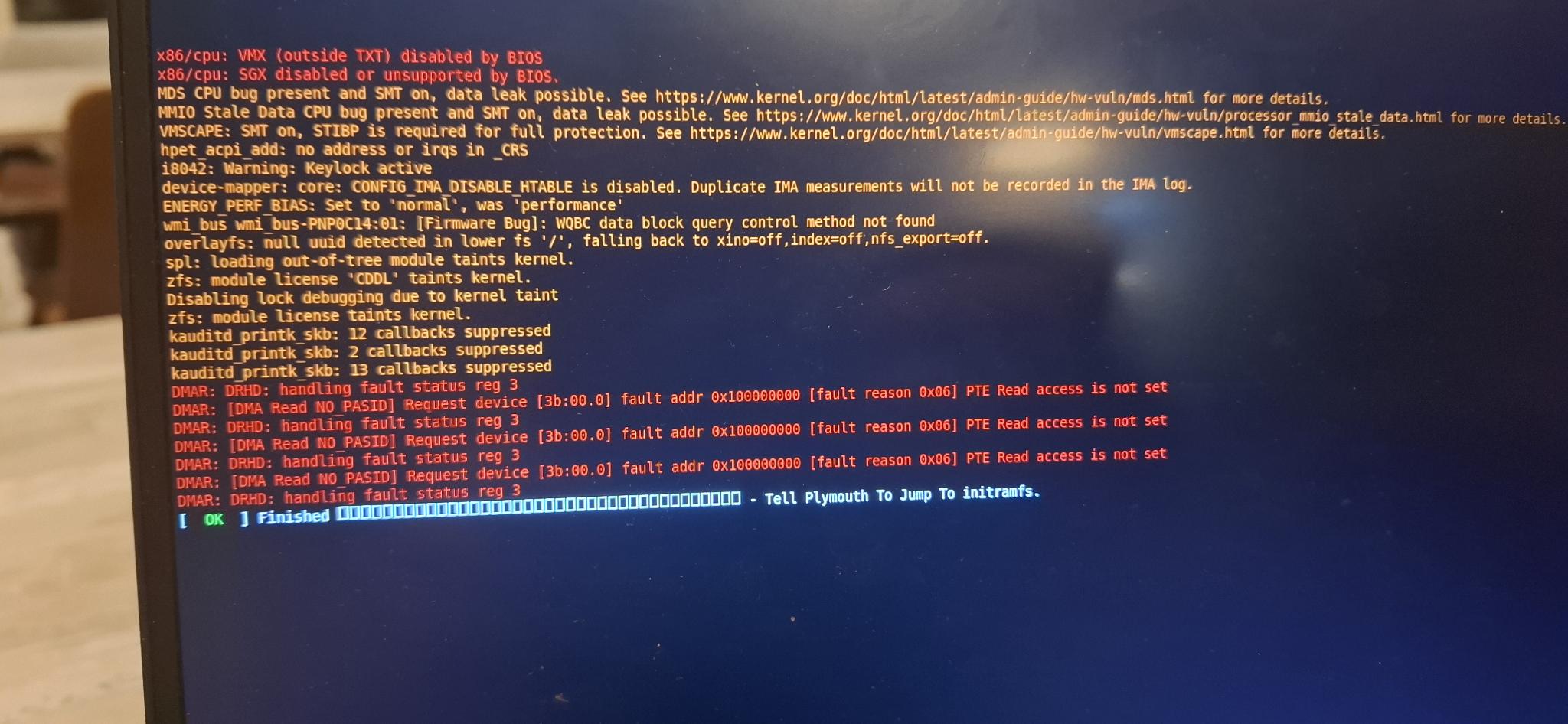
Disable VT-D support in bios
After looking it up online, I found disabeling VT-D virtualisation disables the check becouse the check needs VT-D and IOMMU to run.
This gives more sucess, but ubuntu is not working, it is still stuck on the loading screen.
Failed to create stream fd: no such file or directory
Kernel module not loaded?
I think the Ubuntu 26.04 ISO is broken on some dell laptops?
New ISO image
I got an older image from https://releases.ubuntu.com/24.04/ . Put it on the USB.
while downloading
while downloading I tried some things with UEFI becouse that does not need an OS to be loaded. This was more sucessfull.
./pcileech uefi_textout -kmd UEFI_SIGNAL_EVENT
[+] using FTDI device: 0403:601f (bus 2, device 17)
[+] FTDIFTDI SuperSpeed-FIFO Bridge000000000001
KMD: Searching for EFI BASE (no -efibase parameter supplied).
 Current Action: Waiting for KMD to activate
 Access Mode:    Normal
 Progress:       1974 / 4096 (48%)
 Speed:          164 MB/s
 Address:        0x000000007B600000
 Pages read:     505248 / 1048576 (48%)
 Pages failed:   96 (0%)
KMD: Waiting to receive execution.
EXEC: SUCCESS! shellcode should now execute in kernel!
Please see below for results.

UEFI TEST PROGRAM - PRINT STUFF ON THE SCREEN
===========================================================
Syntax: pcileech.exe uefi_textout
Options (optional):
text: -s <text to print>
position: -0 1 -1 <x_pos> -2 <y_pos>
number of runs (default=1): -3 <number>
GENERAL INFORMATION BELOW:
  TEXT      :     UEFI EVIL FROM PCILEECH!

KMD: Hopefully unloaded.
Maybe in the future I could customise uefi_textout. but that would be another project.
download done
Ubuntu now get’s into the desktop environment. but pcileech is not able to locate kernal signature.
root@valdtaniem:/home/valdtaniem/Applications/PCIleech# ./pcileech kmdload -kmd LINUX_X64_48

[+] using FTDI device: 0403:601f (bus 2, device 18)
[+] FTDIFTDI SuperSpeed-FIFO Bridge000000000001
 Current Action: Scanning for Linux kernel base
 Access Mode:    Normal
 Progress:       10186 / 10184 (100%)
 Speed:          2037 MB/s
 Address:        0x000000027D800000
 Pages read:     2064384 / 2607104 (79%)
 Pages failed:   543232 (20%)
KMD: Failed. Error locating generic linux kernel signature.
PCILEECH: Failed to load kernel module.
suspect: IOMMU
IOMMU disabeling (I spent a lot of time trying)
In bios there is no setting for IOMMU, so I think I have to add the kernal parameter intel_iommu=off or
intel_iommu=igfx_off
. to do that: press ’e’ on the grub screen and add it behind the line with linux. then press ctl-x to boot.
Nope. It did not work.
https://h30434.www3.hp.com/t5/Desktop-Software-and-How-To-Questions/Disable-IOMMU-on-OMEN/td-p/9396696 here it sayes to unlock secret settings:
Power it on and immediately start pressing:
F10 to enter BIOS.
Once in BIOS, try pressing Ctrl + F10 or Ctrl + A or Fn + Tab (three times) and then F10 again to reveal hidden settings.
But that is not available on my xps.
EFI
What does work is EFI (if booting in UEFI):
./pcileech -vv -device FPGA kmdload -kmd LINUX_X64_EFI
resulting:
LcMemMap_AddRange: 0000000000000000-000000000009ffff -> 0000000000000000
LcMemMap_AddRange: 0000000000100000-000000027e7fffff -> 0000000000100000
LeechCore v2.22.11: Open Device: fpga
 Memory Map:
 START              END               #PAGES
 0000000000000000 - 000000000009ffff  000000a0
 0000000000100000 - 000000007b5fffff  0007b500

 Current Action: Waiting for EFI Runtime Services
 Access Mode:    Normal
 Progress:       1984 / 4096 (48%)
 Speed:          165 MB/s
 Address:        0x000000007C000000
 Pages read:     505248 / 1048576 (48%)
 Pages failed:   2656 (0%)
KMD: EFI Runtime Services table hijacked - Waiting to receive execution.
     To trigger EFI execution take action. Example: 'switch user' in the
     Ubuntu graphical lock screen may trigger EFI Runtime Services call.