Valdtaniem
Piratesay
When connecting, you enter a kind of bash shell, where you can use basic commands to navigate and read/write files. You also get a random identity every session, but that is only important to the second vulnerability.
commands:
The Official Pirate Codex:
  scout [destination] - Search current or desired destination for items
  sail [destination] - Set sail for a new destination
  bury - bury treasure for others to find at your destination
  loot [item] - Grab the contents of an item at your destination
  identity - manage your pirate identity
  codex - Display this pirate codex
  dock - Dock your ship and leave Pirate Say
- ls -> scout
- cd -> sail
- help -> codex
- exit -> dock
- help -> codex
- read -> loot
- write -> bury
Vulnerability one
If you input a wrong password when looting treasure the password you gave get’s read back to you: ![[Pasted image 20260710230455.png]]
This Clean_from_formatstrings function that checks on format strings, but not for ‘o’ (used for octal), so we can use that to leak memory (and the password) 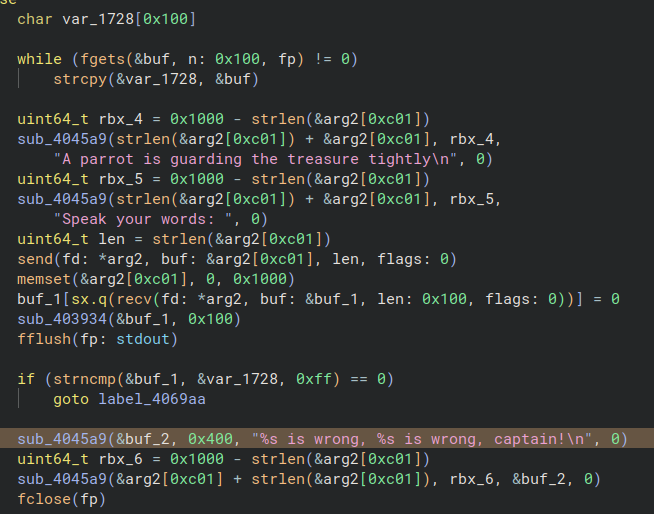
Getting started
DMA stands for Direct Memory Access.
I am using pcileech with a captain DMA M.2 . This is an fpga device so most of the features should work.
Installing DMA device
The xps i’m using only has one m.2 slot, so I can’t boot into an os as you would normaly. I have to boot into a USB wit ubuntu and install the DMA device in the m.2 slot.
But ubuntu hangs on the loading screen, pressing esc to see the logs I can see: